






Ennoia is a Python framework for Declarative Document Indexing (DDI) — you describe what to extract from each document with typed Python schemas, and Ennoia runs the LLM extraction, persists the structured output, and serves hybrid filter + vector search on top. The same schemas drive a Python SDK, a CLI, a REST API, and an MCP tool surface.
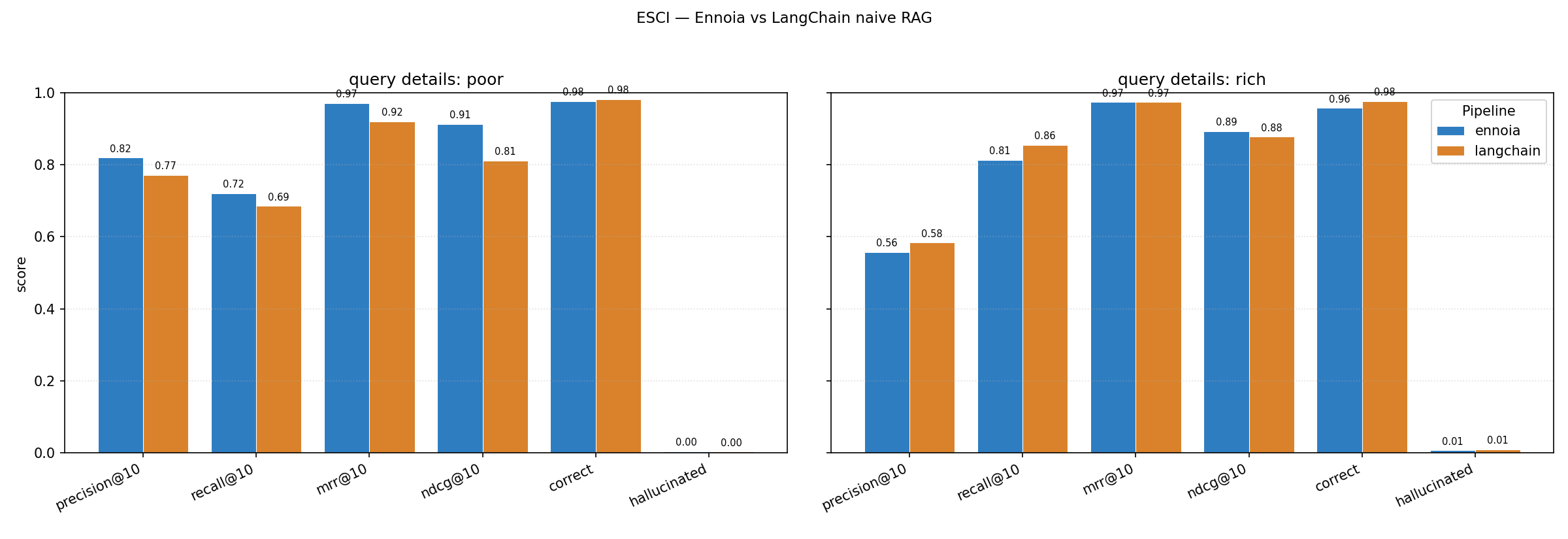
The chart above is one run of the ESCI product-discovery benchmark: 1,000 sampled Amazon products and ~2,000 LLM-generated shopper queries split across two detail bands — poorly formed (vague, no brand or attributes) and richly detailed (brand + concrete features). Ennoia's DDI agent loop leads on every metric for poorly formed queries, where naive embeddings have no lexical anchor to latch onto; on richly detailed queries it reaches parity with LangChain's textbook one-embedding-per-product baseline. The corpus was deliberately chosen so each product fits a single embedding chunk, removing chunked-RAG's failure mode and biasing the comparison against Ennoia — on chunked corpora the gap widens further, since LangChain here is searching the full original document text directly without shredding them into a pieces. See the cookbook page for full methodology and limitations.
Status: alpha (
0.4.x). API is converging but may still shift.
- Installation
- Getting started
- Introduction — what DDI Schemas are and when they pay off
- Schema autodiscover and debug —
ennoia craftandennoia try - Quick setup — index → search → serve in five commands
- Documentation
- Contribution
- Benchmark
- License
- Contributors
pip install "ennoia[all]"all pulls every adapter, store, the CLI, and the server. To stay slim, pick the extras you actually need:
| Extra | Adds |
|---|---|
openai, anthropic, openrouter |
Hosted LLM adapters |
ollama |
Local LLM adapter |
sentence-transformers |
Local embedding adapter |
filesystem |
Parquet + NumPy persistent stores |
qdrant |
Qdrant vector + hybrid store |
pgvector |
PostgreSQL + pgvector hybrid store |
cli |
ennoia command |
server |
FastAPI REST + FastMCP |
all |
Everything above |
The minimal zero-key local stack is pip install "ennoia[ollama,sentence-transformers,cli]".
Generate a project-local config so you do not have to repeat --llm, --embedding, --store, and API keys on every invocation:
# Writes ./ennoia.ini with sensible defaults.
ennoia init
The [ennoia] section maps 1:1 to CLI flags; the [env] section preloads provider API keys via os.environ.setdefault before adapters initialize. Explicit CLI flags still win. Full key map in docs/cli.md.
Scaffold a first-draft schema from a sample document:
ennoia craft ./contracts/sample.txt \
  --output my_extractors.py \
  --llm openai:gpt-4o-mini \
  --task "filter by governing law, effective date, and contract value"
craft writes a fixed three-class skeleton (Metadata for filterable fields, QuestionAnswer for ten Q&A pairs, Summary for a one-line overview). It is a prototype starting point, not production output — review every field, tighten str to Literal[...] once you know the value set, and re-run craft against more samples to refine. Full review checklist in docs/cli.md.
Then drive the index → try → search loop:
ennoia index ./contracts --schema my_extractors.py --store ./contracts_index
ennoia try ./contracts/sample.txt --schema my_extractors.py
ennoia search "payment obligations and late fees" \
  --schema my_extractors.py --store ./contracts_index \
--filter "governing_law=Delaware" --top-k 5Ennoia ships a small set of tools for designing typed schemas, validating them on real documents, and running a fully working RAG pipeline in minutes — without hand-rolling extraction prompts, chunking heuristics, or a glue layer between your filter store and your vector store.
A DDI Schema is a Python class that describes what to pull from each document. The class docstring is the extractor-level prompt; each Annotated[..., Field(description=...)] field is the per-field prompt that rides on the JSON schema sent to the LLM. Three kinds cover the common cases:
BaseStructure— typed scalars / enums you want to filter on (dates, jurisdictions, prices, categories). One row per document.BaseSemantic— free-form text aimed at the vector index ("summarize the holding"). One embedding per document.BaseCollection— repeated entities pulled out of the document (parties, citations, bullet-point features). One row per entity, each independently filterable and searchable.
A Pipeline wires schemas to an LLM adapter, an embedding adapter, and a Store (structured + vector). At index time it runs every schema against the document, executes the optional extend() branches that fan out into deeper extractors, and writes the structured output. At query time it does two-phase retrieval: structural filters narrow the candidate set, and the vector index ranks within. Filter-only is allowed; vector-only is allowed; the common case is both.
Why this beats naive chunk-and-embed: filterable structure (dates, parties, categories) is preserved instead of being shredded into chunks, and vague queries (the broad band in the benchmark above) can still pivot on a structural filter when there is no lexical anchor for similarity search.
A 15-line minimal example:
from typing import Literal
from ennoia import BaseSemantic, BaseStructure, Pipeline, Store
from ennoia.adapters.embedding.sentence_transformers import SentenceTransformerEmbedding
from ennoia.adapters.llm.ollama import OllamaAdapter
from ennoia.store import InMemoryStructuredStore, InMemoryVectorStore


class DocMeta(BaseStructure):
    """Extract basic document metadata."""
    category: Literal["legal", "medical", "financial"]


class Summary(BaseSemantic):
    """What is the main topic of this document?"""


pipeline = Pipeline(
    schemas=[DocMeta, Summary],
    store=Store(vector=InMemoryVectorStore(), structured=InMemoryStructuredStore()),
    llm=OllamaAdapter(model="qwen3:0.6b"),
    embedding=SentenceTransformerEmbedding(model="all-MiniLM-L6-v2"),
)
pipeline.index(text="The court held employers must accommodate disabilities.", source_id="d1")
hits = pipeline.search(query="court holdings on liability", filters={"category": "legal"}, top_k=5)
The full contract-extraction example (with extend() branching, a BaseCollection, and a hybrid filter+vector search) lives at examples/04_extend_branching.py; a smaller two-extractor walkthrough is at examples/01_getting_started.py.
When to reach for Ennoia:
- You need hybrid filter + vector search on the same corpus — not one or the other.
- Your documents carry structure (dates, parties, categories, clauses) that plain chunking discards.
- You want the LLM pre-processing step to be typed and visible in your diff, not buried in a prompt string at runtime.
Two CLI commands close the loop between writing a schema and trusting it:
-
ennoia craft <doc> --output schemas.py --llm <uri> --task "<retrieval goal>"— points an LLM at a sample document and a retrieval task, then writes a ready-to-edit schema module. If the file already exists, the LLM improves the existing schema instead of rewriting it from scratch — so you can runcraftagainst several representative documents in turn to expand enum sets, add fields the first sample missed, and refine docstrings. The output is a fixed three-class skeleton (Metadata/QuestionAnswer/Summary) using only plain scalar types, by design —craftdeliberately avoidsLiteralenums,Optional,list, andextend()branches it cannot infer from one example. It is a starting point for human editing, not a production schema: tighten types, drop or rename fields, and read every docstring before runningennoia indexon real data. -
ennoia try <doc> --schema schemas.py— runs a single extraction pass and prints the fields, per-extraction confidence, andextend()chain. Nothing is written to any store, so it is the fast loop while iterating on schemas. Output is colorised when stdout is a TTY.
The full review checklist for craft output (when to switch str → Literal, which fields belong in Metadata vs QuestionAnswer, how to write corpus-generic docstrings) is in docs/cli.md.
Once you have an ennoia.ini and a schema file, four commands run a complete pipeline end-to-end:
# Index a folder. --store accepts a filesystem path, qdrant:<collection>, or pgvector:<collection>.
ennoia index ./contracts --schema my_extractors.py --store ./contracts_index --collection contracts

# Hybrid search from the shell.
ennoia search "payment obligations and late fees" \
  --filter "governing_law=Delaware" --filter "effective_date__gte=2025-01-01" --top-k 5

# Boot a FastAPI REST server: /discover, /filter, /search, /retrieve, /index, /delete.
ennoia api --store ./contracts_index --schema my_extractors.py --api-key "$ENNOIA_API_KEY"

# Boot an MCP tool server (sse / stdio / http) for agents: discover_schema, filter, search, retrieve.
ennoia mcp --store ./contracts_index --schema my_extractors.py --transport sse
Both servers reuse the same store and schema you indexed against — no duplicated config, no schema drift between offline indexing and online serving. Server flags, auth, and the full endpoint table are in docs/serve.md; a worked agent-loop example using the MCP surface is in docs/cookbook/mcp-agent.md.
- Site index — landing page with the same map.
- Quickstart — five-minute SDK walkthrough on a local Ollama.
- Concepts — DDI Schemas, the extraction DAG, two-phase retrieval.
- Schema authoring —
BaseStructure/BaseSemantic/BaseCollection,extend(), the superschema manifest. - Filter language — operator table shared by SDK, CLI, REST, and MCP.
- Stores — in-memory, filesystem (Parquet + NumPy), Qdrant, pgvector.
- Adapters — built-in LLM and embedding backends plus the ABCs for custom ones.
- CLI —
ennoia init | craft | try | index | search | api | mcpwithennoia.iniconfig. - Servers — REST + MCP — flags, endpoints, auth.
- Testing —
ennoia.testingmocks and pytest fixtures. - API reference — rendered from docstrings.
- Cookbook:
- MCP agent loop — discover → search → retrieve worked example.
- Custom adapters and stores — implementation patterns.
- Product-discovery benchmark — methodology behind the chart at the top.
- Runnable examples — every concept as a standalone script.
Issues, bug reports, and pull requests are welcome at github.com/vunone/ennoia/issues.
Local dev loop:
uv sync --all-extras
uv run pytest                # 100% branch coverage is the bar
uv run pyright               # strict mode is non-negotiable
uv run ruff check
uv run ruff format --check
When sending a PR, keep the diff focused, add tests for new branches, and update the relevant doc page in docs/ — the docs and the README are the public contract.
The chart at the top of this README is generated by benchmark/runner.py. Methodology, query bands, expected shape of results, and limitations are documented in docs/cookbook/product-discovery-benchmark.md; the harness itself, with reproduction commands and CLI flags, lives in benchmark/README.md.
Apache 2.0. See LICENSE.txt and NOTICE.
Sponsored by: Achiv :: Smart Market Research