The Ultimate Windows Network Debloater, Telemetry Purger & Bandwidth Optimizer





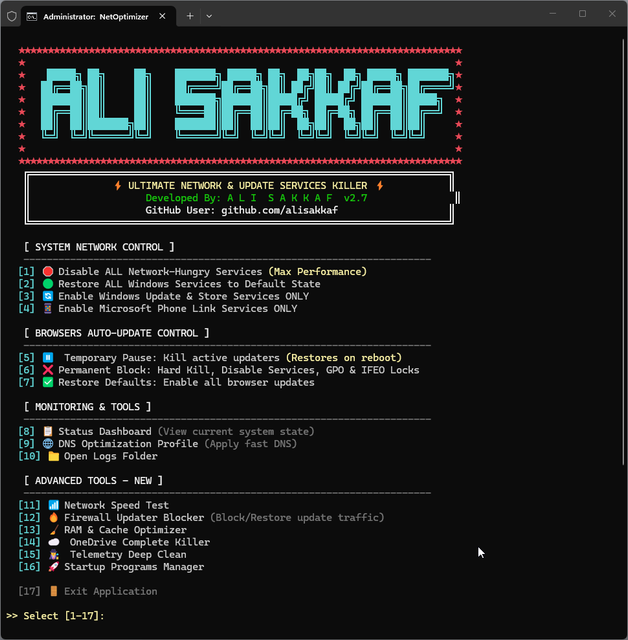
- 🌐 Targeted Browser Update Controls: Introducing a common sub-menu when choosing Option [5] Temporary Pause, [6] Permanent Block, or [7] Restore Defaults. You can now target Chrome, Edge, Brave, or Firefox individually, or choose "ALL Browsers" to process them collectively.
- 🔒 Dynamic Resource Lockdown: Registry policies, services, GPO rules, scheduled tasks, and IFEO debugger blocks are applied specifically per-browser to guarantee zero impact on non-selected browsers.
- 🛡️ Full Edition Synchronization: Feature parity between the Pro (ANSI color + Emojis) and Lite (plain ASCII text) editions, with no global Delayed Expansion and complete compatibility with Windows 7/8/10/11.
NetOptimizer is an aggressively optimized, deeply integrated Batch script designed to give you 100% absolute control over your Windows network bandwidth and system resources.
Modern Windows operating systems and browsers notoriously consume massive amounts of background data for telemetry, silent updates, and background syncing. For users on metered connections, mobile hotspots, or those who simply demand peak ping performance for competitive gaming, this background data bleed is unacceptable.
This tool deploys a proprietary "ZeroLeak Protocol", hunting down aggressive background services, tracking agents, and hidden UI processes, cutting off their internet access instantly. It operates at both the Userland and System Service levels to ensure zero unauthorized bytes leave or enter your machine.
A major concern with traditional "Debloaters" is that they often delete core system files, leading to permanent OS corruption. NetOptimizer is fundamentally different.
IMPORTANT: This script DOES NOT DELETE any system files, services, or registry keys. It exclusively operates by disabling (suspending) services, terminating active RAM processes, altering startup types, and applying Local Group Policy (GPO) blocks. Everything done by this script is 100% reversible with a single click inside the tool.
To ensure absolute compatibility across all environments, NetOptimizer is distributed in two distinct versions. Both share the exact same aggressive core engine but differ in UI rendering to prevent crashes on legacy systems:
| Feature / Edition | ⚡ NetOptimizer Pro | 🪶 NetOptimizer Lite |
|---|---|---|
| Target OS | Windows 10 (Latest Builds) & Windows 11 | Windows 7, 8, and Legacy Win 10 |
| Core ZeroLeak Engine | ✅ Included (Full Power) | ✅ Included (Full Power) |
| Browser Control Engine | ✅ Included | ✅ Included |
| Smart Auto-Updater | ✅ Included (Interactive UI) | ✅ Included (Silent UI) |
| UI Design | Dynamic ANSI Colors & Emojis | Standard ASCII (Pure Text) |
| Encoding | UTF-8 (chcp 65001) |
Native CMD Encoding |
| Best For | Modern Desktop Environments | Legacy Systems, Enterprise Servers |
When you trigger the Disable protocol [Option 1], the script dives deep into the system to perform a multi-layered lockdown:
- Extreme Telemetry & Analytics Purge: Force-kills Microsoft's heaviest data collectors including
CompatTelRunner.exeandDeviceCensus.exe. It also halts Windows Error Reporting (WerSvc) and the Diagnostics Hub to stop massive crash-dump uploads. - Background UI & Sync Termination: Instantly kills memory-resident hogs like
msedgewebview2.exe(hidden web widgets),Widgets.exe(Win 11 news feed), andOneDrive.exebackground pinging. - Chrome Scanner Block: Terminates Google Chrome's notorious
software_reporter_tool.exewhich silently scans local drives and consumes massive bandwidth. - Halts Core Update Engines: Suspends
wuauserv,bits,UsoSvc, and bypasses registry protections to lockWaaSMedicSvc. - Gaming & Superfetch Control: Halts Xbox background syncing (
gamebarpresencewriter.exe,XblAuthManager) and disablesSysMain(Superfetch) to prevent predictive network/disk spikes during gaming. - Network Throttling: Automatically edits the Registry to enforce
Metered Connectionon both WiFi and Ethernet interfaces.
- 1-Click Total Restore [Option 2]: Reverts all 20+ disabled services, tasks, and telemetry agents back to their native
DemandorAutomaticstate. - Windows Update & Store Unlocker [Option 3]: Need to update safely? This option activates the Windows Update engine (
wuauserv,bits,InstallService) and the Microsoft Store services (ClipSVC,AppXSVC) without re-enabling any tracking agents. - Microsoft Phone Link [Option 4]: Exclusively reactivates the essential services for Microsoft Phone Link (
PhoneSvc,NcbService,WpnService,BcastDVRUserService,BluetoothUserService) and restores the required background app registry entries, allowing seamless phone message and photo sync without unlocking the rest of the system bloatware.
Browsers (Chrome, Edge, Brave, Firefox) often ignore standard service disabling by utilizing hidden crash handlers and remoting tools. NetOptimizer features a granular, targeted browser control system:
- Targeted Selection Sub-Menu: Launching Option [5], [6], or [7] prompts a common menu to choose Google Chrome, Microsoft Edge, Brave Browser, Mozilla Firefox, or ALL browsers.
- ⏸️ Temporary Pause [Option 5]: Instantly terminates active browser processes and stops updater services for the selected browser (or all) for the current session only. Everything returns to normal automatically upon a PC reboot.
- ❌ Permanent Block [Option 6]: Hard-kills active updater processes, permanently disables updater services, deactivates scheduled tasks, and injects GPO policy locks and Image File Execution Options (IFEO) debugger traps for the targeted browser (or all).
- ✅ Restore Defaults [Option 7]: Restores auto-update services, scheduled tasks, GPO registry policies, and IFEO debugger settings back to normal for the targeted browser (or all).
NetOptimizer features a highly advanced, bulletproof Auto-Updater built directly into the Batch script. On launch, it safely pings a secure server to check for the latest versions. If an update is found, it uses native curl or PowerShell engines to download, replace, and restart itself within seconds—ensuring you always have the latest telemetry blocks without lifting a finger.
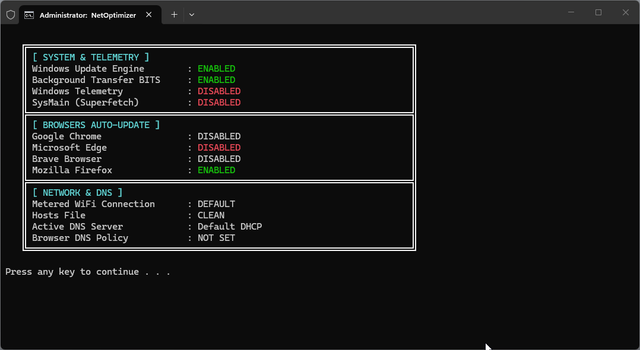
A comprehensive, at-a-glance system status panel that instantly reads and displays the live state of all critical components — no need to open services.msc:
- System & Telemetry: Shows if Windows Update Engine, BITS, Telemetry (DiagTrack), and SysMain (Superfetch) are
ENABLEDorDISABLED. - Browsers Auto-Update: Displays the current update status for Google Chrome, Microsoft Edge, Brave Browser, and Mozilla Firefox.
- Network & DNS: Shows the active DNS server, the Metered Connection enforcement state, the HOSTS file integrity status, and the Browser DNS Policy (DoH).
A professional, fully-featured DNS management hub:
- Live Ping Check: Before displaying the menu, each of the 9 DNS servers is pinged and labeled
[ONLINE]or[OFFLINE]in real-time. - 9 Pre-configured DNS Providers: Cloudflare (1.1.1.1), Google DNS (8.8.8.8), Quad9, AdGuard, ControlD, UncensoredDNS, Shecan, 403 DNS, and Electro DNS.
- [C] Custom DNS: Smart input with Ping Test validation — protects against empty input and applies instantly.
- Browser DoH Enforcement: Forces Chrome, Edge, and Brave to use the selected DNS via Registry Policies (DNS-over-HTTPS in
securemode). - [10] Restore Default DHCP: Fully resets DNS to automatic DHCP and completely removes all browser Registry Policies, including the "Managed by administrator" state.
Every operation performed by NetOptimizer (service disabling, DNS changes, process kills, firewall rules, speed tests, RAM stats) is logged with a precise timestamp to %USERPROFILE%\NetOptimizer_Logs\NetOptimizer_Log.txt. Option 10 opens this logs folder instantly in Windows Explorer.
A built-in speed testing tool powered by PowerShell:
- Downloads a 2 MB test file from
speed.cloudflare.comand calculates the real download speed in Mbps. - Also performs a Ping test to Cloudflare's 1.1.1.1 to display average latency in ms.
- Results are logged with a timestamp for tracking over time.
A dedicated Windows Firewall management sub-menu that adds a network-level enforcement layer on top of service and GPO blocks:
- Block: Adds outbound firewall rules to prevent update executables (
wuauclt.exe,WaaSMedicAgent.exe,GoogleUpdate.exe,MicrosoftEdgeUpdate.exe,BraveUpdate.exe, etc.) from establishing any outgoing connection. - Restore: Removes all
NetOptimizer_Block_*firewall rules cleanly. - Status: Lists all currently active NetOptimizer firewall rules.
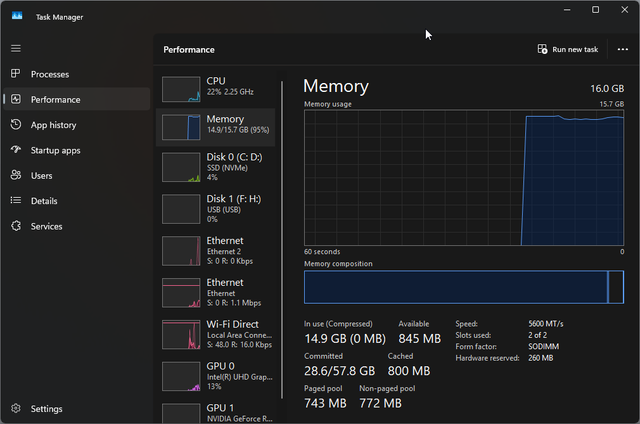
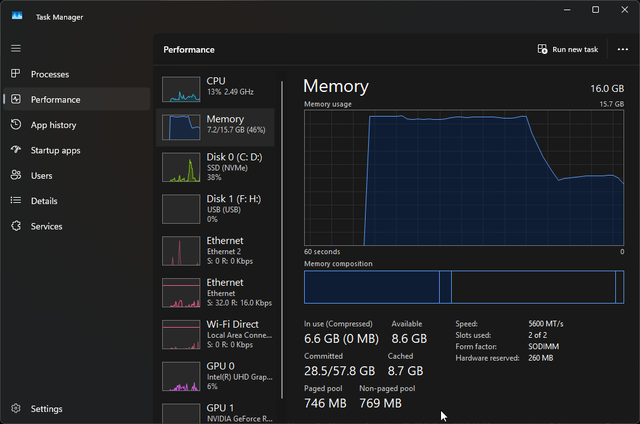
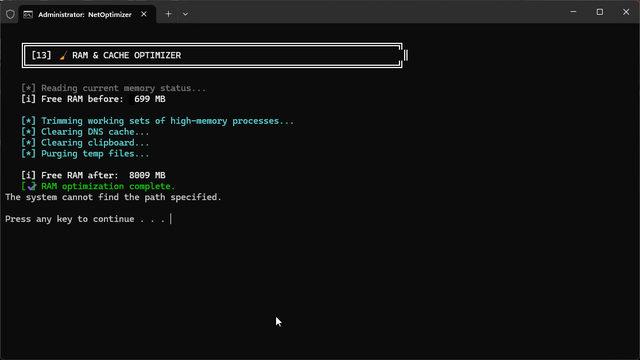
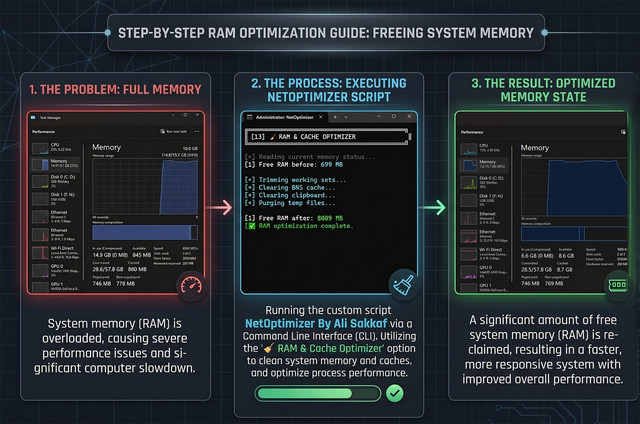
A multi-step memory reclamation tool:
- RAM Trimming: Uses PowerShell to trim the working sets of all processes consuming more than 50 MB of RAM, forcing Windows to release cached memory pages.
- DNS Cache Flush: Clears the DNS resolver cache (
ipconfig /flushdns). - Clipboard Clear: Wipes the system clipboard to free memory.
- Temp File Purge: Deletes all
.tmpand.logfiles from the user's%TEMP%folder. - Displays Free RAM before and after in MB so you can see exactly how much was recovered. Results are logged.
A targeted OneDrive elimination sub-menu that does not touch your files:
- Kill & Block: Force-terminates
OneDrive.exe, removes it from all startup Registry keys (HKCUandHKLM), injects GPO blocks to disable file sync (DisableFileSyncNGSC), and disables OneDrive's scheduled update and reporting tasks. - Restore: Removes all GPO blocks and restores OneDrive's startup Registry entry so it runs again after a reboot.
A surgical, registry-level telemetry neutralization protocol that goes beyond service stopping:
- Registry Lockdown: Sets
AllowTelemetryto0(Security level — minimum possible) across all Microsoft data collection policy paths. - Advertising & Activity Block: Disables the Windows Advertising ID and completely shuts down Activity History and Timeline feed uploads (
EnableActivityFeed,PublishUserActivities). - HOSTS File Nullrouting: Appends
0.0.0.0entries to the system HOSTS file for 10 known Microsoft telemetry domains (includingvortex.data.microsoft.com,watson.telemetry.microsoft.com, etc.), effectively cutting off their network access at the OS level. Already-blocked domains are intelligently skipped.
A comprehensive startup entry audit and management tool:
- Full Audit View: Lists all startup entries from three sources:
HKCURun registry (current user),HKLMRun registry (all users), and the Startup Folder. - Disable by Name: Allows you to type the exact name of any registry startup entry to remove it permanently from
HKCUorHKLMRun keys. Logs the action with a timestamp. - Quick Access: Shortcut buttons to open the Startup Folder in Explorer or launch Task Manager directly to the Startup tab.
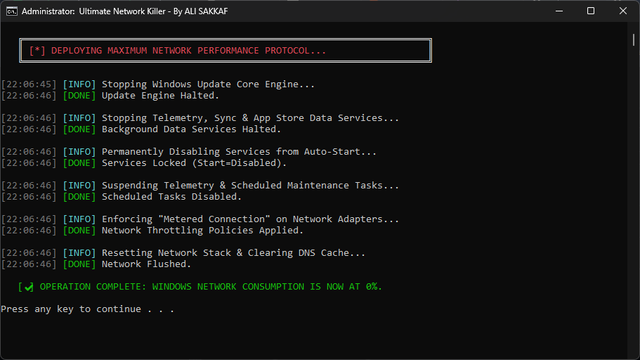
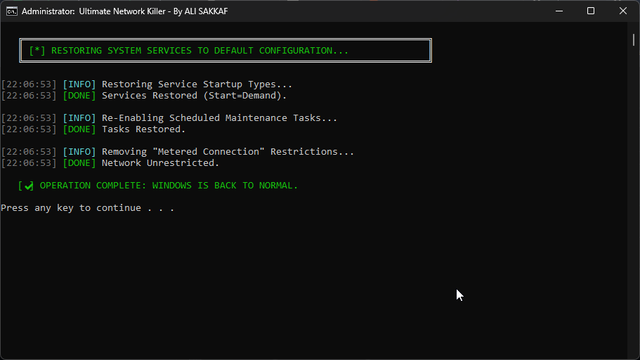
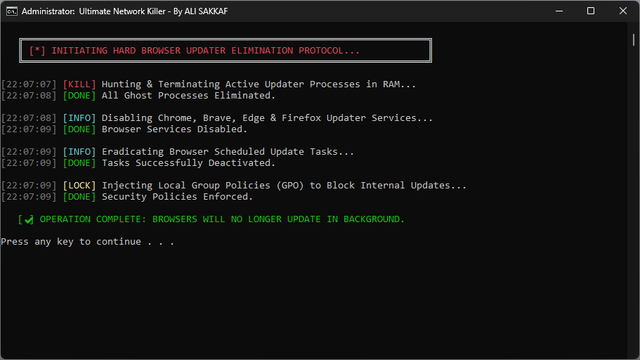

Witness the true power of the NetOptimizer RAM & Cache engine. Reclaim gigabytes of wasted memory in seconds!
| 🔴 Before Optimization | 🟢 After Optimization |
|---|---|
 |
 |
| ⚡ Interactive CLI | 📖 Smart Guide |
|---|---|
 |
 |
- Go to the Releases page and download either
NetOptimizer_Pro.batorNetOptimizer_Lite.batdepending on your OS. - Right-click the downloaded
.batfile and select "Run as Administrator". (The script includes an automated UAC elevation check, but manual elevation is best practice). - Let the Auto-Updater check for the latest core files (takes max 5 seconds).
- The interactive menu will appear. Select your desired execution protocol by typing a number
[1-17]and pressing Enter. - Watch the dynamic console log execute your commands. Wait for the green
[✔] OPERATION COMPLETEmessage. - Restart your PC to allow Registry (GPO) changes to propagate fully.
USE AT YOUR OWN RISK. This is an aggressive system administration script. By using this tool, you acknowledge and agree to the following:
- Disabling Windows Updates permanently prevents your system from receiving critical security patches, leaving you vulnerable to zero-day exploits.
- It is highly recommended to periodically use the [2] Restore or [3] Enable Windows Update ONLY option to update your system securely, let it finish, and then deploy the Disable protocol again.
- The developer is not responsible for any system instability, security breaches, data loss, or OS corruption that may occur from the misuse of this tool.
| Crypto Asset | Network | Wallet Address (Copy) | Quick Scan |
|---|---|---|---|
 |
TRC20 | TYLBeDA5aGNcc3WkVqf3xWPHXmsZzs2p28 |
 |
|
BEP20 | 0x67cf27f33c80479ea96372810f9e2ee4c3b095c5 |
|
 |
Bitcoin | bc1q97dr37h37npzarmmrv0tjz2nm50htqc7pfpzj6 |
|
 |
ERC20 | 0x67cf27f33c80479ea96372810F9e2EE4C3b095C5 |
|
 |
Solana | Cbesgr4tvo4T1inNMFe46GSym2qMYjkmofbXFc77rDNK |
|
Made By Ali Sakkaf ❤️